Layers:
- Add this layer to a map in the map viewer. The layer is limited to scales of approximately 1:144,000 or larger but an imagery layer created from the same data can be used at smaller scales to produce a webmap that displays across the full scale range. The layer or a map containing it can be used in an application.
- Change the layer’s transparency and set its visibility range
- Open the layer’s attribute table and make selections and apply filters. Selections made in the map or table are reflected in the other. Center on selection allows you to zoom to features selected in the map or table and show selected records allows you to view the selected records in the table.
- Change the layer’s style and filter the
data. For example, you could set a filter for System Text = 'Palustrine' to create a map of palustrine wetlands only.
- Add labels and set their properties
- Customize the pop-up
- Add this layer to a 2d or 3d map. The same scale limit as Online applies in Pro
- Use as an input to geoprocessing. For example, copy features allows you to select then export portions of the data to a new feature class.
- Change the symbology and the attribute field used to symbolize the data
- Open table and make interactive selections with the map
- Modify the pop-ups
- Apply Definition Queries to create sub-sets of the layer
- OBJECTID (type: esriFieldTypeOID, alias: OBJECTID, SQL Type: sqlTypeOther, length: 0, nullable: false, editable: false)
- attribute (type: esriFieldTypeString, alias: Wetland Code, SQL Type: sqlTypeOther, length: 20, nullable: true, editable: true)
- wetlandtype (type: esriFieldTypeString, alias: Wetland Type, SQL Type: sqlTypeOther, length: 50, nullable: true, editable: true)
- system (type: esriFieldTypeString, alias: System, SQL Type: sqlTypeOther, length: 2, nullable: true, editable: true)
- class (type: esriFieldTypeString, alias: Class, SQL Type: sqlTypeOther, length: 3, nullable: true, editable: true)
- modifier1 (type: esriFieldTypeString, alias: Modifier 1, SQL Type: sqlTypeOther, length: 1, nullable: true, editable: true)
- modifier2 (type: esriFieldTypeString, alias: Modifier 2, SQL Type: sqlTypeOther, length: 1, nullable: true, editable: true)
- modifier3 (type: esriFieldTypeString, alias: Modifier 3, SQL Type: sqlTypeOther, length: 1, nullable: true, editable: true)
- systemname (type: esriFieldTypeString, alias: System Name, SQL Type: sqlTypeOther, length: 15, nullable: true, editable: true)
- subsystemname (type: esriFieldTypeString, alias: Subsystem Name, SQL Type: sqlTypeOther, length: 20, nullable: true, editable: true)
- classname (type: esriFieldTypeString, alias: Class Name, SQL Type: sqlTypeOther, length: 25, nullable: true, editable: true)
- subclassname (type: esriFieldTypeString, alias: Subclass Name, SQL Type: sqlTypeOther, length: 25, nullable: true, editable: true)
- modifier1name (type: esriFieldTypeString, alias: Modifier 1 Name, SQL Type: sqlTypeOther, length: 45, nullable: true, editable: true)
- modifier2name (type: esriFieldTypeString, alias: Modifier 2 Name, SQL Type: sqlTypeOther, length: 45, nullable: true, editable: true)
- modifier3name (type: esriFieldTypeString, alias: Modifier 3 Name, SQL Type: sqlTypeOther, length: 45, nullable: true, editable: true)
- popupheader (type: esriFieldTypeString, alias: Popup Header, SQL Type: sqlTypeOther, length: 300, nullable: true, editable: true)
- systemtext (type: esriFieldTypeString, alias: System Text, SQL Type: sqlTypeOther, length: 400, nullable: true, editable: true)
- classtext (type: esriFieldTypeString, alias: Class Text, SQL Type: sqlTypeOther, length: 750, nullable: true, editable: true)
- modifiertext (type: esriFieldTypeString, alias: Modifier Text, SQL Type: sqlTypeOther, length: 1000, nullable: true, editable: true)
- speciestext (type: esriFieldTypeString, alias: Species Text, SQL Type: sqlTypeOther, length: 1075, nullable: true, editable: true)
- Shape__Area (type: esriFieldTypeDouble, alias: Shape__Area, SQL Type: sqlTypeDouble, nullable: true, editable: false)
- Shape__Length (type: esriFieldTypeDouble, alias: Shape__Length, SQL Type: sqlTypeDouble, nullable: true, editable: false)
- systemname: Marine
- systemname: Estuarine
- systemname: Palustrine
- systemname: Riverine
- systemname: Lacustrine
Layer: USA Wetlands (0)
Name: USA Wetlands
Display Field: systemname
Type: Feature Layer
Geometry Type: esriGeometryPolygon
Description:
Wetlands are areas where water is present at or near the surface of
the soil during at least part of the year. Wetlands provide habitat for
many species of plants and animals that are adapted to living in wet
habitats. Wetlands form characteristic soils, absorb pollutants and
excess nutrients from aquatic systems, help buffer the effects of high
flows, and recharge groundwater. Data on the distribution and type of
wetland play an important role in land use planning and several federal
and state laws require that wetlands be considered during the planning
process.
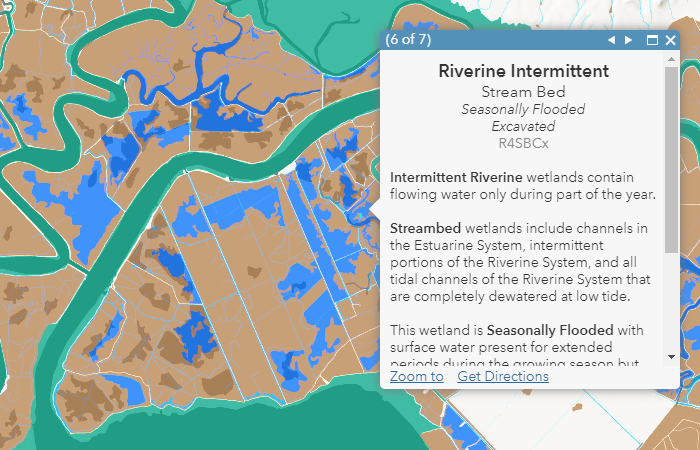
The National Wetlands Inventory (NWI) was designed to assist land managers in wetland conservation efforts. The NWI is managed by the US Fish and Wildlife Service.
Dataset Summary
Phenomenon Mapped: Wetlands
Coordinate System: Web Mercator Auxiliary Sphere
Extent: 50 United States plus Puerto Rico, the US Virgin Islands and the Northern Mariana Islands
Visible Scale: The data is visible at scales from 1:144,000 to 1:1,000. An imagery layer created from this dataset is also available which you can also use to quickly draw wetlands at scales smaller than 1:144,000.
Resolution/Tolerance: 0.0001 meters/0.001 meters
Number of Features: 34,482,400 diced, after applying a 50,000 vertex limit.
Feature Limit: 10,000
Source: U.S. Fish and Wildlife Service
Publication Date: November 29, 2021
ArcGIS Server URL: https://landscape11.arcgis.com/arcgis/
This layer was created from the November 29, 2021 version of the NWI. The
original NWI features were downloaded from USFWS on January 25, 2022.
They were then converted to a single part feature class using the Multipart To Singlepart tool. After that, the Dice tool
was used to break up features larger than 50,000 vertices. The Repair Geometry
tool was run on the features, using tool defaults.
NWI derived attributes:
Wetland Code - a code that identifies specific attributes of the wetland
Wetland Type - one of 8 wetland types
Area - area of the wetland in acres
Esri created attributes:
System - code indicating the system and subsystem of the wetland
Class - code indicating the class and subclass of the wetland
Modifier
1, Modifier 2, Modifier 3, Modifier 4 - these four fields contain
letter codes for modifiers applied to the wetland description
System Name - the name of the system (Marine, Estuarine, Riverine, Lacustrine, or Palustrine)
Subsystem Name - the name of the subsystem
Class Name - the name of the class
Subclass Name - the name of the subclass
Modifier
1 Name, Modifier 2 Name, Modifier 3 Name , Modifier 4 Name - these four
fields contain names for modifiers applied to the wetland description
Popup Header - this field contains a text string that is used to create the header in the default pop-up
System Text - this field contains a text string that is used to create the system description text in the default pop-up
Class Text - this field contains a text string that is used to create the class description text in the default pop-up
Modifier Text - this field contains a text string that is used to create the modifier description text in the default pop-up
Species Text - this field contains a text string that is used to create the species description text in the default pop-up
Codes, names, and text fields were derived from the publication Classification of Wetlands and Deepwater Habitats of the United States.
What can you do with this Feature Layer?
ArcGIS Online
Copyright Text: Source: USFWS, Esri
Min. Scale: 217153
Max. Scale: 739
Default Visibility: true
Max Record Count: 2000
Supported query Formats: JSON, geoJSON, PBF
Use Standardized Queries: True
Extent:
-
XMin: 1444697.39614921
YMin: 718042.214955309
XMax: 1498294.94251828
YMax: 762337.492739597
Spatial Reference: 102722 (3734)
Drawing Info:
- {"renderer":{"type":"uniqueValue","field1":"systemname","uniqueValueInfos":[{"symbol":{"type":"esriSFS","style":"esriSFSSolid","color":[0,115,76,255],"outline":{"type":"esriSLS","style":"esriSLSNull","color":[110,110,110,255],"width":0}},"value":"Marine","label":"Marine"},{"symbol":{"type":"esriSFS","style":"esriSFSSolid","color":[0,167,135,255],"outline":{"type":"esriSLS","style":"esriSLSNull","color":[110,110,110,255],"width":0}},"value":"Estuarine","label":"Estuarine"},{"symbol":{"type":"esriSFS","style":"esriSFSSolid","color":[183,129,74,255],"outline":{"type":"esriSLS","style":"esriSLSNull","color":[110,110,110,255],"width":0}},"value":"Palustrine","label":"Palustrine"},{"symbol":{"type":"esriSFS","style":"esriSFSSolid","color":[0,168,229,255],"outline":{"type":"esriSLS","style":"esriSLSNull","color":[110,110,110,255],"width":0}},"value":"Riverine","label":"Riverine"},{"symbol":{"type":"esriSFS","style":"esriSFSSolid","color":[0,111,255,255],"outline":{"type":"esriSLS","style":"esriSLSNull","color":[110,110,110,255],"width":0}},"value":"Lacustrine","label":"Lacustrine"}],"fieldDelimiter":","},"scaleSymbols":true,"transparency":0,"labelingInfo":null}
HasZ: false
HasM: false
Has Attachments: false
Has Geometry Properties: true
HTML Popup Type: esriServerHTMLPopupTypeAsHTMLText
Object ID Field: OBJECTID
Unique ID Field:
-
Name : OBJECTID
-
IsSystemMaintained : True
Global ID Field:
Type ID Field: systemname
Fields:
Types:
- ID: Marine
Name: Marine
Domains:
- Name: Marine
Description:
Drawing Tool: esriFeatureEditToolPolygon
Prototype:
- Attributes:
ID: Estuarine
Name: Estuarine
Domains:
- Name: Estuarine
Description:
Drawing Tool: esriFeatureEditToolPolygon
Prototype:
- Attributes:
ID: Palustrine
Name: Palustrine
Domains:
- Name: Palustrine
Description:
Drawing Tool: esriFeatureEditToolPolygon
Prototype:
- Attributes:
ID: Riverine
Name: Riverine
Domains:
- Name: Riverine
Description:
Drawing Tool: esriFeatureEditToolPolygon
Prototype:
- Attributes:
ID: Lacustrine
Name: Lacustrine
Domains:
- Name: Lacustrine
Description:
Drawing Tool: esriFeatureEditToolPolygon
Prototype:
- Attributes:
Is Data Versioned: false
Has Contingent Values: false
Supports Rollback On Failure Parameter: true
Last Edit Date: 10/4/2022 5:46:36 PM
Schema Last Edit Date: 10/4/2022 5:46:36 PM
Data Last Edit Date: 10/4/2022 5:46:36 PM